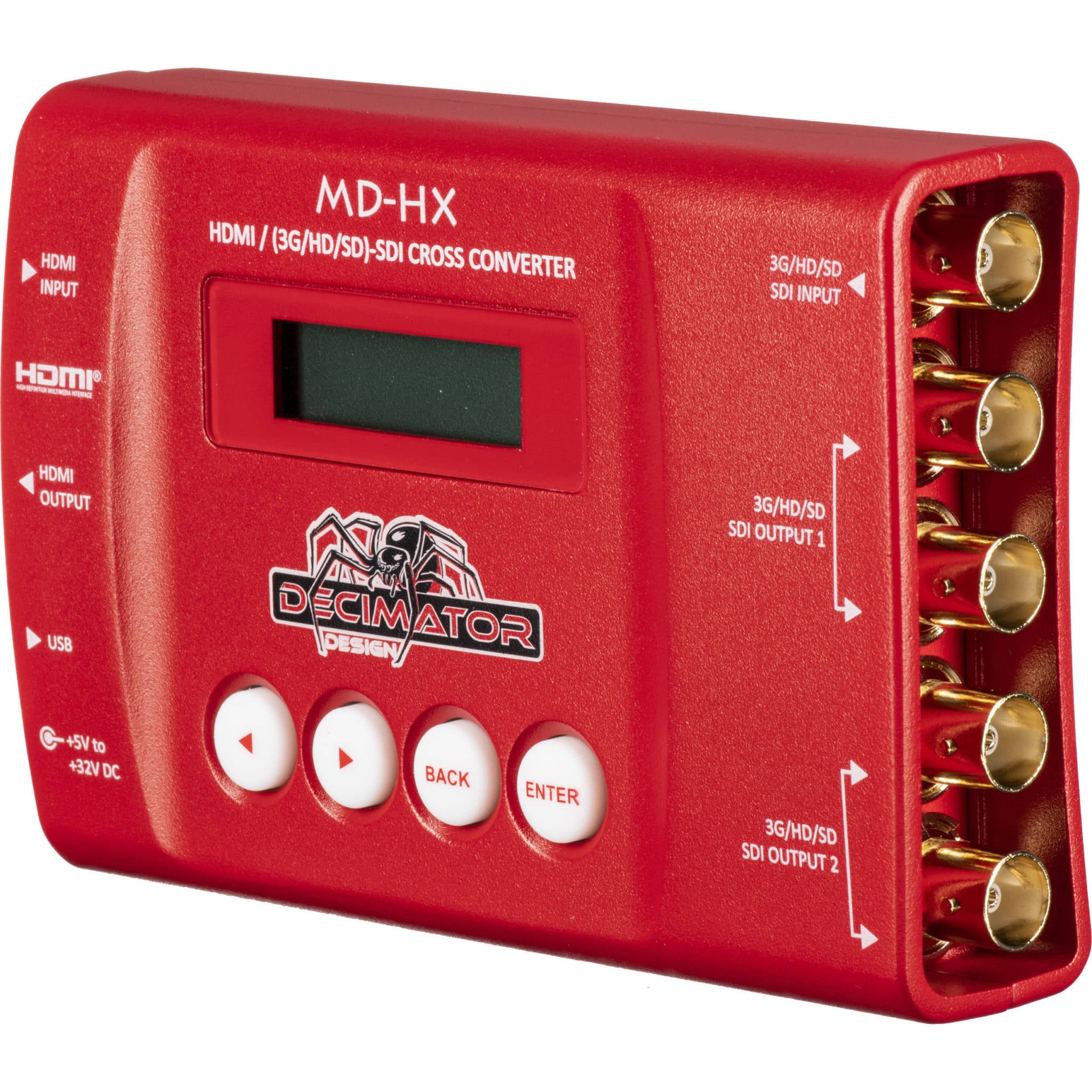
If you work in live events or video production, you’ve probably heard someone say, “Grab a Decimator.” They’re talking about the Decimator MD-HX, a tiny red box that solves a huge range of signal headaches on show day. Think of it as the AV world’s Swiss-army knife for converting, scaling, and troubleshooting video signals — all without diving into a laptop.
What the MD-HX actually does (in plain English)
-
Cross-converts between SDI and HDMI (either direction), so the kit you have can talk to the kit you’re given.
-
Scales and re-rates the signal to the resolution/refresh the display will accept — perfect when a screen refuses to play nice.
-
Manages EDID so your source knows exactly what format to output.
-
Distributes: loop/convert a single feed into multiple outputs for confidence monitors, recorders, and stream encoders.
-
Troubleshoots: on-box menus and status readouts make it easy to identify where the chain is failing.
In short: HDMI in, SDI out; SDI in, HDMI out; scale it; fix it; go live.
Real-world problems a Decimator fixes
-
Presenter laptop only outputs 1080p/60, venue projector wants 720p/50 → MD-HX scales and re-rates on the fly.
-
Vision mixer is SDI-only, you’ve got an HDMI camera → convert to SDI with proper clocking and long-run reliability.
-
Uncooperative screens (EDID quirks) → lock EDID so the source stops renegotiating mid-show.
-
Need feeds for IMAG, a recording, and a confidence monitor → convert/loop and distribute reliably.
Is there an “audio equivalent” to a Decimator?
Not as a single box. In audio, the problems the MD-HX solves are spread across a few different categories. Your best bet is a small toolkit that covers the same kinds of issues:
-
Format & level translation (like HDMI↔SDI):
-
DI boxes (active/passive) to go from instrument/consumer level to mic level, with ground lift and pads to kill hum and tame hot signals.
-
Line-level interfaces to shift between consumer -10 dBV and professional +4 dBu gear cleanly.
-
-
Clocking / sample-rate & digital format conversion (the “scaler” of audio):
-
Sample-rate/format converters to translate between AES/EBU, S/PDIF, ADAT, and different sample rates without clicks or pitch change.
-
-
Distribution / splitting (one in, many out):
-
Distribution amps and isolated splitters to feed recorders, press boxes, and PA simultaneously without loading the source.
-
-
Protocol bridging (the EDID/handshake analogue):
-
Network audio adapters (e.g., Dante, AVB) or USB audio interfaces to get audio cleanly in/out of computers and IP networks while handling clocking and handshakes.
-
So while there isn’t a single “Audio Decimator,” a compact kit with a good stereo DI, a small format/SRC box, a 1×4 distribution amp, and a network audio adaptor will cover 95% of the live-sound gremlins the same way the MD-HX does for video.
Quick setup checklist for stress-free show days
-
Identify the endpoints: what does your source output, and what does your display/mixer accept?
-
Lock EDID early (video) or confirm sample rate/bit-depth (audio) before doors.
-
Set the scaler to the native resolution of the display; avoid “auto” if the chain is flaky.
-
Use proper cabling (quality HDMI for short hops, SDI for long runs; balanced audio for long lines).
-
Label your paths so last-minute swaps don’t break the chain.
Tips & Tricks for Using the Decimator MD-HX
-
Quick infrastructure test (no source needed):
Set Menu → Output → Reference to Free Run and route Output → Scaler. The unit will generate solid colours, letting you prove your cabling, distribution, and screens are good. If the colours appear everywhere but the laptop doesn’t, your infrastructure is OK—the issue is likely the source or EDID. -
Force the source to behave (EDID lock):
In HDMI EDID, pick a profile that matches the display (e.g., 1080p50, 2-ch audio). Locking EDID stops renegotiation mid-show and stabilises flaky laptops. -
Scale to the display’s native res (avoid “Auto”):
Under Scaler, set a fixed output (e.g., 1920×1080@50) to match the projector/panel’s native timing. Fixed timings reduce handshakes and black-outs during scene changes. -
Use status pages for fast fault-finding:
Check Status → Input/Output to confirm the actual format hitting the box. If input isn’t what you expect, fix the upstream device first—don’t chase ghosts downstream. -
Level A/B gotcha (3G-SDI):
If a mixer/processor won’t see your SDI, toggle 3G-SDI Level A/B in the menu. Many devices are picky—switching levels often brings the picture back instantly. -
Aspect controls to save the day:
If a 4:3 screen is stretching your 16:9 feed (or vice-versa), set Aspect/Pillarbox/Letterbox in the scaler so onsite screens look correct without editing the source. -
Preset the “show-safe” format:
Save a preset with your go-to timing (e.g., 1080p50, EDID locked, Level B). If you have to swap units, load the preset and you’re back in spec in seconds. -
Dual-purpose distribution:
Use the converted output to feed the fussy display and the loop/second output for record/stream/IMAG. One stable source, multiple reliable destinations. -
Last-minute laptop swaps:
Don’t re-teach the screen every time. Keep the MD-HX locked to the display’s native timing; only adjust input scaling if the replacement laptop refuses to match.
Hire the right tools (and people)
We stock the Decimator MD-HX along with companion audio tools (DIs, distribution amps, and protocol bridges) so you can convert, scale, and distribute with confidence. If you’re unsure what you need, tell us your source and destination gear and we’ll spec the signal path for you.
—
Need help speccing a tricky signal chain?
Call 01635 899551 or email [email protected] and we’ll get you sorted.
Can we help with your next idea? Don’t hesitate to reach out to our team to discuss your needs and find the best solution for you.
Recent Blog Posts
X32 Compact vs Yamaha DM3 Standard — Which Mixer We Grab (and Why)
AVE Services stocks both the Behringer X32 Compact and the Yamaha DM3 Standard (non‑Dante). We’re [...]
A Smarter Hybrid Conference Setup: 10 Mics, 4 PTZ NDI Cameras, and a Biamp Tesira Brain
A Smarter Hybrid Conference Rig That Thinks For Itself Hybrid meetings shouldn’t feel like a [...]
Results calls & webcasts: how finance teams avoid dropouts at 08:00
An 08:00 (UK) results call or earnings webcast is perfect for market timing—but it’s also [...]
RC Car Event: Off‑Grid Power + Battery PA System (Case Study)
Outdoor motorsport meets quiet, reliable tech. Here’s how we kept an RC car race day [...]
The Benefits of a Wireless, Battery-Powered PA System for Live Events
If your event covers a lot of ground—or needs to stay tidy and trip-free—a wireless [...]

The Complete Guide to LED Battery Powered Uplighting Hire
Lighting That Transforms Every Occasion Lighting has the power to change a space, create atmosphere, [...]